How to Get Rid of Clean Light on Cuisinart Coffee Makers
A practical, step-by-step guide to reset the Clean light on Cuisinart coffee makers with descaling, rinsing, and maintenance best practices.


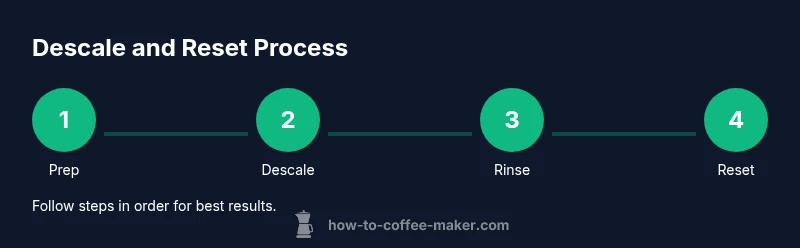
To get rid of the Clean light, follow a clear descaling and rinsing routine. Start with a recommended descaler or a vinegar solution, then run multiple water-only cycles and finish with a reset or power cycle. This approach works for most Cuisinart models and reduces future maintenance alerts. Keep the reservoir clean and ensure you use the correct descaler per the model manual. Avoid mixing cleaners.
Understanding the Clean Light on Cuisinart Coffee Makers
The Clean light on a Cuisinart brewer is a maintenance indicator. It signals that the machine should be descaled and cleaned to maintain optimal performance. For many users, this light appears after mineral buildup from hard water or occasional sensor calibration. If you are wondering how to get rid of clean light on cuisinart coffee maker, you are not alone. In this guide, we walk through a safe, practical approach that works across most models. BrewGuide Pro notes that a regular descaling routine reduces maintenance reminders and helps preserve flavor and efficiency. Follow the steps, gather the right descaling solution, and you will restore normal operation without guesswork.
When to Descale vs Simply Reset
Not every clean light requires the same remedy. If the reservoir is mineral-stained or the machine tastes off, start with a descale cycle using a recommended descaler or a vinegar solution. If the light comes back after a single descale, repeat the process or consult the model manual. In some cases the light is a reset signal rather than corrosion; a power cycle may clear it after maintenance. BrewGuide Pro analysis shows that sticking to manufacturer guidance and using the approved descaler minimizes repeated alerts.
Descaling Options: Vinegar vs Commercial Descaler
Two main paths exist for descaling. A commercial descaler is formulated to be safe for coffee equipment and may be preferred for sensitive models. A vinegar solution is inexpensive and effective, but it can leave a smell if not rinsed thoroughly. If you choose vinegar, mix a solution such as one part vinegar to one part water and run several cycles, followed by multiple plain-water rinses. Always refer to your manual for any model-specific cautions.
Step-by-Step Descale and Rinse Routine
Begin by preparing the brewer and materials. Unplug the machine and remove the filter basket and carafe. Fill the reservoir with your descale solution as directed. Run a cleaning cycle or the equivalent, stopping early if your model instructs so you can refill. Let the machine sit for a few minutes to allow the solution to contact scale. Then run a full cycle with plain water to rinse.
Resetting the Clean Light After Descaling
After descaling and rinsing, reset the light according to your model manual. In many cases this involves a power cycle: unplug for several minutes, then plug back in and run one or two water-only cycles. Some models require holding a reset or program button for several seconds. If the light remains, repeat the descaling process or consult support.
Safe Cleaning of Carafe, Basket, and Water Reservoir
While internal cycles run, clean the exterior and removable parts. Wash the carafe, basket, and lid with warm soap and water. Wipe the hot plate with a damp cloth, being careful with heat. Ensure the sealing gaskets are clean and free of mineral buildup. Regular cleaning prevents stubborn residue that can trigger maintenance alerts.
Common Pitfalls and Troubleshooting
If the light stays on after multiple descales, verify you are using fresh descaling solution and completing all rinse cycles. Check that the water path is not blocked and that the reservoir is properly seated. Some models require a flow test; if you hear no water moving, inspect the filter or nozzle. Authority sources include credible references: https://www.cdc.gov, https://www.fda.gov, https://www.nist.gov.
Maintenance Habits to Prevent Reoccurrence
Establish a routine: descale every 1-3 months depending on water hardness and frequency of use. Use filtered water to reduce mineral buildup. After each use, rinse carafe and basket and dry. Periodically run a water-only cycle to flush the system. Regular maintenance helps prevent the clean light from lighting up unexpectedly. The BrewGuide Pro team recommends setting a maintenance calendar to stay on track.
BrewGuide Pro Recommendations and Final Thoughts
The BrewGuide Pro team recommends treating the Clean light as a prompt for proper descaling and cleaning. Use manufacturer-approved descalers and follow the model's manual for reset procedures. With diligent maintenance, your Cuisinart brewer will produce consistent flavor and avoid unnecessary downtime.
Tools & Materials
- Descaling solution (commercial) or white vinegar(Follow model directions; for vinegar, use diluted solution as recommended.)
- Distilled water(For descaling and rinse cycles.)
- Measuring cup(To mix descaler solution accurately.)
- Microfiber cloth(For exterior wipe-down and drying.)
- Soft brush or old toothbrush(For stubborn deposits around nozzles or gasket.)
- Container for catching used solution(Helpful when catching drips during cycles.)
Steps
Estimated time: 45-60 minutes
- 1
Power down and prep
Unplug the brewer, remove the carafe and filter basket, and gather your descaling supplies. This reduces the risk of electric shock and keeps parts accessible for cleaning.
Tip: Take a quick photo of parts layout if your model is complex. - 2
Empty and rinse parts
Rinse the carafe and filter basket with warm water. Wipe the heater plate and exterior to remove surface dust before descaling.
Tip: Check seals and gaskets for residue before reassembly. - 3
Prepare descaling solution
Mix your descaler according to the product label or use a 1:1 vinegar-to-water solution if allowed by your manual. Ensure the reservoir is ready to receive the solution.
Tip: Do not mix multiple cleaners together. - 4
Run the descaling cycle
Fill the reservoir with the prepared solution and run a brew cycle. Stop when the reservoir is empty or as directed by your manual, allowing contact with mineral deposits.
Tip: If your model has a pre-soak option, use it for better results. - 5
Soak and flush
Let the solution sit in the system for 5–10 minutes, then restart to complete the cycle. This helps dissolve stubborn scale.
Tip: Do not leave the solution in contact for too long on delicate components. - 6
Rinse with fresh water, cycle 1
Refill with fresh water and run a full cycle to rinse out any descaling solution. Repeat until the reservoir runs clear.
Tip: Change the carafe if it retains odors. - 7
Rinse with fresh water, cycle 2
Run a second or third water-only cycle to ensure all residue is removed and no odor remains.
Tip: Smell tests help confirm thorough rinsing. - 8
Reset the Clean light
Power cycle the unit by unplugging for several minutes, then plug back in and run one or two plain water cycles. If the light persists, consult the model manual for a dedicated reset.
Tip: If unsure, contact customer support for model-specific reset steps.
Questions & Answers
Why is the Clean light on my Cuisinart?
The Clean light signals maintenance is needed, usually due to mineral buildup or sensor calibration. Descaling and thorough rinsing typically resolves it. If the light stays, check your model manual for reset steps.
The Clean light means maintenance is needed; descaling and rinsing usually fix it. If it remains, consult your model's reset steps.
Can I use vinegar to descale?
Vinegar can work on many models if the manual allows it. Dilute with water and follow with multiple water rinses to remove odor. If your manual recommends a commercial descaler, use that instead.
Vinegar can work if your manual allows it; rinse well afterward.
How often should I descale?
Descale frequency depends on water hardness and usage. A common guideline is every 1 to 3 months, more often in hard water areas. Adjust based on the light behavior and flavor changes.
Most people descale every 1 to 3 months depending on water hardness.
What if the Clean light won’t reset?
Try a power cycle by unplugging for a few minutes, then plug in and run several rinse cycles. If it still stays on, consult the manual for a model-specific reset or contact support.
If it won’t reset after descaling, power cycle and rinse again; contact support if needed.
Is it safe to operate without the filter basket?
No. The filter basket is part of the brew path and helps prevent splashing. Always reinstall removable parts before testing cycles.
Don’t run without the basket; it can cause spills or misbrewing.
Watch Video
Key Takeaways
- Descale first, then rinse thoroughly
- Power cycle to reset the light
- Use manufacturer-approved descalers
- Maintain a regular descaling schedule
- Check the model manual for resets