How to Reset the Keurig Coffee Maker: A Practical Guide
Learn how to reset your Keurig coffee maker with a safe power cycle and descaling approaches. This BrewGuide Pro guide walks you through methods, safety tips, and maintenance to keep your brewer reliable and ready for flavorful cups.


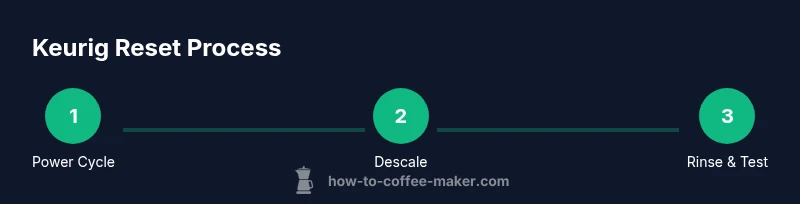
Resetting a Keurig typically starts with a simple power cycle: unplug the brewer, wait a full minute, then plug it back in and test with water. If issues persist, perform a descaling cycle using Keurig’s descaling solution or a manufacturer-approved product, followed by thorough rinsing. This two-step approach fixes most common brewers’ glitches.
Why Resetting a Keurig Can Fix a Range of Issues
A reset is often the quickest path to restoring normal operation when your Keurig shows quirky behavior. Mechanical hiccups, unresponsive buttons, or inconsistent brewing temperatures can stem from software glitches, stale water in the boiler, or mineral buildup. A reset helps by refreshing the brewer’s electronics, clearing minor firmware quirks, and reinitializing internal timers. In many households, a quick power cycle combined with a careful descale resolves problems without needing professional service. BrewGuide Pro, in its 2026 analysis, has repeatedly found that home users see the most reliable results by pairing a light reset with a routine descaling schedule. This approach keeps your machine performing closer to spec and extends its lifespan.
Key takeaway: start with a simple power reset, then evaluate the need for descaling or deeper maintenance. This low-cost, low-effort option often fixes the majority of everyday problems and reduces downtime for your coffee routine.
Understanding Keurig Reset Types: Power Cycle vs Factory Reset
There are different reset concepts you might encounter. A power-cycle reset simply restarts the brewer by cutting power, which clears transient errors and resets the software state. A factory reset, when available on certain models, restores original settings and can erase custom preferences. For most households and many model families, the power cycle is sufficient to clear common faults and won’t affect user preferences. It’s important to consult your model’s manual to confirm whether a factory reset option exists and what it does for your specific brewer. When in doubt, start with the power cycle and only move to a factory reset if issues persist and you’ve backed up any custom settings.
Why this matters: using the factory reset without need can erase preferences or saved data that you may rely on, so proceed with caution and follow the model guidance.
When to Reset: Common Symptoms That Indicate a Reset Is Needed
Consider resetting your Keurig if you notice any of the following: the machine fails to start, brews at inconsistent temperatures, yields weak or erratic coffee, displays error messages, or pours only hot water without coffee. If the brewer has internal water-sensor issues, random beeping, or won’t purge the lines during a brew cycle, a reset is a sensible first step before deeper troubleshooting. Pair the reset with a descaling cycle when you suspect mineral buildup from hard water. By combining these approaches, you address both software and mineral contributing factors that commonly break the brewing rhythm.
Pro tip: keep a simple maintenance log to track when you reset and descale so you can spot recurring patterns and plan preventive care.
Quick Power-Cycle Reset: A Safe First Try
To perform a basic power-cycle reset, follow these actions: unplug the Keurig from the wall outlet, remove the water reservoir and any K-Cups from the compartment, wait 60 seconds, then plug the brewer back in and reinsert the reservoir. Refill with fresh water and run a couple of non-coffee cycles to clear any lingering impurities. After these cycles, test by brewing a cup of hot water. If the issue persists, move to a descaling cycle.
Why it works: this reset clears temporary firmware glitches and recalibrates internal sensors, which often resolves minor hiccups. Remember to avoid using the unit while it’s unplugged and keep the area dry to prevent any electrical hazards.
Tip: keep a small towel nearby to wipe up any drips during reassembly and testing.
Descale and Reset: When Mineral Buildup Is the Culprit
If you’re dealing with white residue, slow brewing, or off-tasting coffee, mineral buildup may be the culprit. Descaling helps dissolve mineral deposits that can cling to the boiler, tubes, and sensors. Use a manufacturer-approved descaling solution and follow the product instructions closely. Fill the reservoir with the descaler solution per the guidelines, run a few cycles, and then flush with several cycles of clean water to remove any residue.
Note: never mix descaling products with other cleaners, and never use concentrated cleaning agents not intended for coffee makers. After descaling, some models benefit from a brief cooldown period before you resume normal use to avoid thermal shock to internal components.
A short rest period improves the descaling outcome and reduces the chance of residual taste in your first post-descale brews.
Aftercare: Rinse, Refill, and Test Your Brewer
Post-reset, thoroughly rinse the system. Refill the reservoir with fresh water, run at least two full cycles without coffee to flush the lines, and then brew a test cup with coffee to confirm the machine’s performance. If your model uses a removable drip tray or a water reservoir lid, ensure they’re seated correctly to prevent leaks and misreads. Keep your manual handy for model-specific steps such as particular button presses or cycle orders. This is the transitional phase where you verify that reset and descale have restored expected operation.
Reminder: always allow the unit to cool between cycles if you’ve just completed a hot-water run, and check for any error codes on the display after each test brew.
Maintenance Tips to Prevent Future Glitches
To minimize the need for resets, create a simple maintenance routine: descale every 3–6 months depending on water hardness and usage, use filtered or distilled water when possible, and wipe the exterior with a damp cloth to prevent mineral build-up on vents. Regular cleaning of the needle and K-Cup area also helps maintain consistent performance. If you notice persistent glitches after maintenance, document the symptoms and timing to help you troubleshoot or discuss with support.
BrewGuide Pro’s long-term guidance emphasizes a routine that blends occasional resets with consistent descaling. This combined approach keeps most Keurig units operating smoothly and provides a predictable coffee routine.
When to Seek Help or Service
If reset and descale do not resolve the issue, it may be time to seek professional advice or contact the manufacturer’s support. Some problems, such as intermittent electrical faults, leaking seals, or damaged internal components, may require repair or replacement parts. Before contacting support, gather information: model number, purchase date, and a concise description of the symptoms and steps you’ve already taken. This helps your support contact be efficient and effective.
In the end, a supported path often yields faster resolution and ensures you don’t void warranties by attempting unsupported repairs.
Tools & Materials
- Power outlet or wall socket(Ensure the outlet is not controlled by a switch and is functioning.)
- Clean water(For initial test brews and rinsing after cycles.)
- Keurig Descale solution or manufacturer-approved descaler(Use during descaling cycles per product instructions.)
- Measuring cup(Useful for measuring water or descaler if needed.)
- Towel or cloth(To catch drips during maintenance.)
- Access to faucet and sink(Needed for rinsing and draining if you perform manual cleaning.)
Steps
Estimated time: 30-45 minutes
- 1
Power-cycle the brewer
Unplug the Keurig from the wall and remove the water reservoir. Wait 60 seconds to allow internal capacitors to discharge and the electronics to reset. Plug the machine back in and reattach the reservoir, ensuring everything is seated properly.
Tip: Unplugging first reduces the risk of electric shock while you handle the unit. - 2
Run a quick rinse without coffee
Fill the reservoir with fresh water and run 2–3 hot-water cycles without inserting a K-Cup. This flushes out any dislodged debris and resets flow patterns.
Tip: If your model has a strong water flow, pause between cycles to let the sensor reset. - 3
Prepare for descaling (if needed)
If issues persist after the power cycle, prepare a descaling solution per the manufacturer’s directions. Fill the reservoir with the solution and run 1–2 cycles, allowing a short dwell time (as recommended) to dissolve mineral buildup.
Tip: Do not mix descaler with soap or other cleaners. - 4
Descale the machine following the manufacturer’s cycle
Allow the descaling solution to sit in the reservoir as directed, then complete the recommended number of cycles with the descaler in contact with internal surfaces. Rinse thoroughly by running several cycles with clean water to remove any descaler residue.
Tip: A lingering descaler residue can affect taste, so thorough rinsing is essential. - 5
Rinse and test with water
After descaling, perform 2–3 additional water-only cycles to flush the system completely. Brew a cup of hot water to confirm the flow is steady and the water temperature is consistent.
Tip: Check for any unusual noises or leaks during the test run. - 6
Brew a test cup of coffee
After successful rinsing, run a cup with your usual coffee setting to verify normal brewing performance. If the coffee tastes off, repeat a brief rinse and consider repeating the descaling cycle if mineral buildup is suspected.
Tip: Taste is a practical indicator of whether the reset and descale were effective.
Questions & Answers
What is the difference between a power-cycle reset and a factory reset for a Keurig?
A power-cycle reset restarts the brewer by cutting power and reinitializing software. A factory reset restores default settings on models that support it and may erase saved preferences. Always check your manual for model-specific behavior.
A power-cycle reset restarts the machine; a factory reset restores defaults on some models and might erase saved preferences.
Will resetting my Keurig erase my saved preferences or favorites?
In most cases, a simple power-cycle reset won’t erase saved preferences. A formal factory reset, if available for your model, could revert settings to default. Always verify with your model’s documentation.
Most resets don’t erase saved preferences, but a factory reset can, in some models.
Should I use vinegar or a Keurig-descaling solution for descaling?
Keurig recommends using their descaling solution or another manufacturer-approved descaler. Vinegar is sometimes discouraged due to potential residue and odor, depending on the model. Consult your manual for recommended products.
Use a descaling solution made for coffee makers rather than vinegar, to avoid residue and flavor issues.
How often should I descale my Keurig?
Descaling frequency depends on water hardness and usage. A common guideline is every 3–6 months, or more often for hard water. If you notice buildup or off flavors, descale sooner.
Descale every few months, especially if you have hard water or notice scale buildup.
What should I do if reset doesn’t fix the problem?
If resetting and descaling don’t resolve the issue, contact Keurig support or consider professional service. Have your model number and purchase date ready to speed up diagnosis.
If it still doesn’t work, reach out to support for next steps.
Are Mini or other compact Keurig models reset the same way as full-size models?
Most steps are similar across Keurig models, but always check the specific model’s manual for any differences in button sequences or cycle orders.
Compact models usually follow the same approach, but verify steps in the manual for your model.
Watch Video
Key Takeaways
- Power-cycle first; it fixes most glitches quickly.
- Descale when mineral buildup is suspected to maintain performance.
- Rinse thoroughly after descale to avoid off flavors.
- Keep a maintenance log to anticipate future needs.