How to Reset a Cuisinart Coffee Maker
Learn safe, practical methods to reset a Cuisinart coffee maker, fix common glitches, and restore routine brewing. Includes soft resets, hard resets (model-dependent), and aftercare tips for long-term performance.


Resetting your Cuisinart coffee maker resolves many common glitches by clearing temporary memory and restoring factory-like defaults. Start with a simple soft reset (power cycle) to fix unresponsive controls, then move to a hard reset if your model supports it. For model-specific sequences, consult the manual. This guide covers safe soft resets, model-guided hard resets, and aftercare.
Why Resetting Your Cuisinart Coffee Maker Matters
Resetting is a practical first step when your machine behaves erratically, clocks flash, or a brew cycle seems stuck. A reset clears temporary memory and stops stuck logic without requiring disassembly. According to BrewGuide Pro, most home coffee makers recover quickly from a basic reset, returning to normal operation within a few minutes. This is especially helpful when you notice unexpected brew times, wrong display readings, or stubborn error messages. Remember: resetting does not erase your saved programs in every model; some units keep programmer schedules after a reboot, while others revert to default settings. Always consult your model’s manual for exact behavior after a reset. In any case, a reset is safe and non-destructive when performed as described here, and it can save you a service call.
Before You Reset: Quick Checks
Before you reset, do a quick diagnostic pass and rule out common culprits that mimic a software fault. Start by descaling if you haven’t done so recently; mineral buildup can create strange sensor readings and mislead the machine’s logic. Empty the carafe and filter basket, rinse the water reservoir, and wipe the brew group to remove any residue. Ensure the power cord is fully seated in the outlet, and check that the machine isn’t currently in a brewing cycle or cleaning cycle. If you observe an error code, jot it down—some codes relate to water flow, overheating, or a sensor fault and may guide your repair path. By doing these checks first, you’ll avoid chasing a reset when the root cause is something simpler.
Soft Reset: The Simple Power-Cycle Method
Most Cuisinart models respond well to a soft reset that clears memory and resets the clock. The basic steps are simple and safe: unplug the unit, wait momentarily, then plug it back in. After reconnecting power, allow the machine to initialize for 30-60 seconds and, if applicable, run a quick hot-water cycle without grounds. If the display shows the clock, set it to the correct time. This gentle reset resolves many issues without altering your programmed brew times.
Hard Reset: When a Soft Reset Isn’t Enough
Hard resets are model-specific and should be performed only if the soft reset hasn’t resolved the issue. Because button combinations vary, consult your manual for the exact sequence. In many cases, a hard reset involves powering off, then holding a pair of buttons (for example, the program and brew buttons) while reconnecting power, until a diagnostic indicator blinks or a reset confirmation occurs. If your model lacks a documented hard reset, skip this step and proceed with descaling and reprogramming after a soft reset. Always stop if you see unusual smells, heat, or sparks and discontinue use until you confirm safety.
After Reset: Reprogramming and Verification
Once the unit resets, re-enter any clock time, preferred brew settings, and any custom programs you typically use. Run a test brew with water only or with a mild coffee to verify the grinder or brew group engages correctly. Check for leaks, unusual noises, or persisting error codes. If you reset to factory defaults, you may need to reprogram your auto-brew times and strength settings. This is also a good moment to re-run a cleaning cycle or descale if mineral buildup reappears after the reset.
Maintenance to Avoid Future Resets
Resetting should be a rare maintenance tool, not a substitute for preventive care. Schedule regular descaling based on your water hardness and usage, clean the brew basket and carafe after each use, and replace worn seals or gaskets as needed. Keep your manual handy and note model-specific steps for future resets. If your unit continues to misbehave after a reset, consider professional service or replacement rather than repeatedly resetting.
Tools & Materials
- Power outlet and power cord(Have a nearby outlet; ensure the cord is not frayed)
- Owner's manual or model-specific reset guide(Helpful for button sequences)
- Clean cloth or sponge(Wipe surfaces after maintenance)
- Descaling solution or white vinegar(Optional for post-reset maintenance)
Steps
Estimated time: 15-25 minutes
- 1
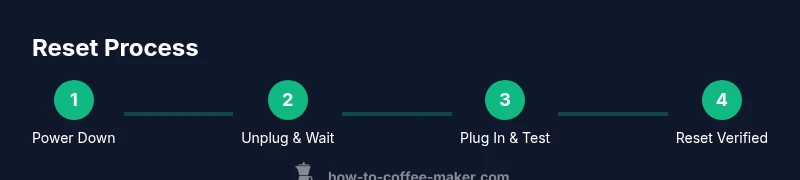
Power Down and Safety Check
Unplug the coffee maker and allow any hot components to cool. This prevents accidental burns and ensures the reset timing is accurate.
Tip: Always start with safety first; hot components can cause injury. - 2
Unplug and Wait
Keep the unit unplugged for 30-60 seconds to discharge residual power and clear transient memory.
Tip: A short pause helps ensure a clean reset state. - 3
Plug In and Test
Reconnect the power and run a short hot-water cycle with no coffee to verify basic operation and check for errors.
Tip: Listen for proper pump operation and confirm water flow before proceeding. - 4
Check the Clock
If the display shows a blinking clock, set the correct time using the unit’s clock controls.
Tip: If your model uses a manual reset sequence, perform it as directed in the manual. - 5
Attempt Soft Reset
If issues persist, perform a soft reset by power cycling again: unplug, wait briefly, and plug back in.
Tip: Avoid starting a brew during the reset window to prevent interruptions. - 6
Consider a Hard Reset (Manual-Directed)
If your model supports a hard reset, follow the exact steps from your manual; this may involve a button combo.
Tip: Have the manual handy to verify the sequence; if uncertain, skip this step. - 7
Finalize with Cleaning/Descale
After reset, run a cleaning or descaling cycle, then brew with fresh water to rinse.
Tip: Regular descaling significantly reduces future reset needs.
Questions & Answers
How do I know if my Cuisinart coffee maker needs a reset?
Look for error messages, a blinking or unresponsive display, or abnormal brew behavior. Start with a soft reset, and only move to a hard reset if your manual confirms the sequence for your model.
If you see an error or the controls won’t respond, try a soft reset first. If that doesn’t help, check your manual for model-specific hard reset steps.
Is resetting erasing my programmed times or settings?
Reset behavior varies by model. Some resets return the unit to factory defaults and may erase custom programs, while others preserve certain settings. Check your manual to understand how yours behaves.
Reset can clear some saved settings, so you may need to reprogram times and preferences after resetting.
Can I reset during a cleaning cycle?
It’s best to avoid resetting while a cleaning or descaling cycle is active. Stop the cycle, complete the reset sequence, and then resume maintenance after the cycle ends.
Don’t reset in the middle of cleaning. Let it finish, then reset if needed.
What if the reset doesn’t fix the problem?
If issues persist after a reset, perform a thorough descale, inspect seals and filters, and consider professional service if abnormal behavior continues.
If the issue remains, descaling and checking components may help. If not, seek professional help.
How long should I wait after unplugging?
Wait several seconds before plugging back in to ensure a proper reset state and avoid power surges.
Give it a few seconds before reconnecting to reset memory cleanly.
Watch Video
Key Takeaways
- Start with a soft reset to fix most glitches.
- Model-specific resets vary; manual is essential.
- Descale and clean regularly to reduce reset frequency.
- If problems persist, seek service instead of repeatedly resetting.