How Often to Change Filter in Cuisinart Coffee Maker
Learn how often to change the water filter in a Cuisinart coffee maker, how to recognize signals that it needs replacement, and a practical step-by-step plan to keep your brews tasting fresh and your machine running smoothly.


You should aim to replace the water filter in a Cuisinart coffee maker every 60–90 days of typical use, or sooner if your water is hard or you notice off-tastes or odors. Keep an eye on any indicator lights and follow your model’s manual for exact steps. This keeps coffee flavorful and the machine running reliably.
Why filter quality matters for coffee and machine health
A clean, fresh-tasting cup starts with clean water. The water filter in your Cuisinart coffee maker reduces minerals and impurities that can dull aroma and flavor, and it helps protect heating elements from mineral buildup. Regular replacement is essential for consistent performance and to avoid off-tastes. According to BrewGuide Pro, staying on a predictable filter schedule reduces flavor fluctuations and makes routine care easier. In hard-water regions, the filter life is tested by mineral load, so plan to replace more often. By treating filter changes as part of your routine, you’ll notice clearer brews and smoother operation over time.
Coffee flavor is not just about beans; it’s about water quality. Even small mineral differences can shift acidity and body. A fresh filter acts as the first line of defense against taste drift, ensuring your morning brew remains balanced. If you share coffee with guests, predictable filter changes help you keep consistency across servings. Remember that the filter’s job is to improve water before it touches the coffee grounds, so prioritize timely changes as part of your routine.
How to determine your replacement schedule and what affects it most
The right replacement cadence depends on usage, water quality, and your specific Cuisinart model. If you drink more coffee daily, you’ll want to replace filters sooner; if your water is soft, you can extend the interval a bit. BrewGuide Pro analysis shows that users who track the date of installation and set a fixed reminder experience fewer surprises. Start with a baseline of every 60–90 days of typical household use, then adjust based on taste, odor, and any indicator lights. For families with hard water, plan for more frequent changes and consider using bottled or filtered water to extend filter life.
A practical approach is to treat filter changes as a quarterly task, with a quick mid-quarter check if you notice taste changes. If your model has an indicator, use it as your primary signal and still log dates for reference. Keeping a simple calendar or app reminder helps you maintain consistency across seasons and busy periods.
Water hardness, filter life, and model variations you should know
Not all Cuisinart models use the same filter, and some rely on different types or sizes. Always consult your model’s manual to confirm compatibility and replacement type. In hard water areas, mineral buildup can reduce filtration efficiency, so plan for earlier changes. Even within a single model line, filter life can vary depending on how often you brew and how full the reservoir is. Tracking usage helps you tailor a schedule that keeps taste consistent without over-spending on replacements.
If your model uses a replaceable charcoal cartridge with a visible indicator, that indicator may not perfectly align with your taste; taste testing remains a reliable check. For homes with frequent guests or high daily use, consider setting two reminders: one for the filter, and another for descaling as part of a separate maintenance routine.
Signs your filter needs changing now (even if your schedule says otherwise)
Noticeable signs are a wake-up call that the filter is no longer performing. If coffee tastes flat or feels metallic, if the aroma is weak, or if the brew looks cloudy, replace the filter promptly. Some machines show a filter indicator light or message; if it’s illuminated, don’t delay. Also, if your water looks muddy after long storage, it’s a signal that the filter’s adsorption capacity may be reached. Address these cues quickly to avoid flavor deterioration and potential buildup in the reservoir.
Taste and scent are your best early warnings. If you’ve used the same filter for longer than your typical cycle, a subtle difference in flavor may appear before the indicator changes color. Don’t rely on appearances alone—perform a quick taste check to verify freshness.
Best practices to maximize filter life and performance
Always purchase the manufacturer-recommended charcoal filter compatible with your model. Rinse and gently shake the new filter before installation to remove loose fibers. After installation, run several cycles of clean water through the machine to flush out any loose carbon and to purge air. Use clean water and avoid exposing the unit to heat or direct sunlight when storing filters. Keep a simple log with installation date and model to optimize future maintenance.
Storing filters in a cool, dry place helps maintain their efficacy. If your household uses reusable water containers, fill them with filtered water to reduce mineral load in the reservoir over time. Regular maintenance like wiping the reservoir lid and exterior ensures you catch leaks or drips early, which supports filter life as well.
Common mistakes to avoid during filter changes
Don’t skip flushing after installation; failing to rinse can affect taste and filtration. Avoid using old or generic filters not approved by the manufacturer. Refrain from over-tightening housing caps, which can crack sealing o-rings. Avoid mixing hard water with mineral-rich filters; if your water is hard, consider a dual-filter approach or a different filtration system to maintain flavor without excessive mineral buildup.
Another common error is assuming the filter life is the same across all households; model-specific guidance matters. If you see inconsistent coffee flavor, revisit your filter’s installation orientation and ensure the correct model is in use. Finally, don’t ignore indicator lights—their messages are designed to prevent flavor drift and equipment wear.
Tools & Materials
- Replacement water filter (charcoal cartridge)(Use the filter model specified for your Cuisinart coffee maker.)
- Soft cloth or sponge(For wiping the reservoir lid and exterior surfaces.)
- Mild dish soap(Gentle cleaning for the exterior; avoid harsh chemicals.)
- White vinegar (optional)(For descaling as part of broader maintenance, not as a substitute for filter changes.)
- Measuring cup or pitcher(To rinse and flush water cleanly.)
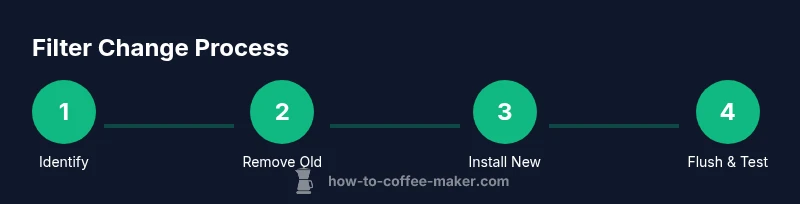
Steps
Estimated time: 20-35 minutes
- 1
Identify model and locate the filter
Consult your user manual to confirm filter type and location. Open the reservoir lid and locate the filter housing. If unclear, check the model number on the back or bottom of the unit for model-specific guidance.
Tip: Refer to the manual’s diagram; if you can’t locate it, search the model number on the manufacturer’s site. - 2
Remove old filter and discard
Gently turn or pull to release the old filter from its housing. Set it aside and dispose of it according to your local guidelines. Wipe the housing with a soft cloth to remove residue.
Tip: Keep a towel handy to catch any leaks or spills. - 3
Inspect and choose replacement
Verify you have the correct replacement filter for your model and check packaging for installation direction. If you’re unsure, contact customer support or check the model’s official page for compatibility.
Tip: If unsure about compatibility, don’t force the fit. - 4
Install new filter correctly
Insert the new filter with the proper orientation until it seats fully. Do not overtighten the housing. If there’s resistance, recheck alignment.
Tip: Gently rotate if needed to align notches or guides. - 5
Rinse and purge the filter
Rinse the new filter under running water for 10–15 seconds (or per your model’s instruction). Reinstall and run 2–3 cycles of clean water through the machine to flush out carbon fines and aerate the system.
Tip: This primes the filter and prevents initial sediment in your brew. - 6
Record date and set reminders
Note installation date in a maintenance log or calendar app. Set a reminder for the next replacement within 60–90 days, or as advised by your model’s indicator light.
Tip: Keep a visible reminder where you’ll see it regularly.
Questions & Answers
How often should I change the water filter in a Cuisinart coffee maker?
Most models use a replaceable charcoal water filter; aim for every 60–90 days of typical use, and sooner if your water is hard or you notice taste changes.
Aim to replace the filter about every two to three months, especially in hard water. Check for taste changes or indicator lights as extra signals.
What happens if I skip changing the filter?
Old filters can harbor bacteria and may cause stale flavors or reduced filtration efficiency, leading to off-tastes and mineral buildup.
Skipping filter changes can lead to off flavors and mineral buildup in the machine.
Can I reuse a filter?
Charcoal water filters are designed for single use; reusing a filter is not recommended and can compromise performance.
No, replace filters; reusing can affect taste and filtration.
How can I tell when the filter is due to be replaced?
Many models have a filter indicator light. If in doubt, set a 60-90 day replacement reminder and rely on taste cues.
If your model has a filter indicator, use it; otherwise track replacement every couple of months.
Is there a recommended filter type for all Cuisinart models?
Use the official charcoal water filter approved for your specific Cuisinart model to ensure compatibility and performance.
Use the manufacturer-approved charcoal filter made for your model.
Should I replace the filter when descaling?
Descaling and filter replacement are separate tasks. Do both as part of a regular maintenance routine for best results.
Descale and replace the filter as part of routine maintenance.
Watch Video
Key Takeaways
- Set a fixed replacement window (60–90 days) for most home brews.
- Replace the filter sooner if you notice off-tastes, odors, or indicator lights.
- Always flush and prime a new filter before brewing coffee.
- Keep a date log to maintain consistent water quality over time.